
AI is changing who can build software. People who could never write code can now describe an idea and generate a working application in minutes, using any number of agentic coding solutions.
But generating an application is only part of the equation. To solve real business problems, applications need to connect to enterprise data and systems, operate securely, and fit within the processes people rely on every day. And as more people become app builders, IT needs the governance and controls to confidently bring those solutions into the enterprise.
That’s why we’re introducing natural language app building in Copilot Cowork and Copilot Studio, bringing agentic app creation into the same trusted, connected enterprise platform you already rely on. In Copilot Cowork, build apps with the new /app skill now available via the Microsoft Frontier program. In Copilot Studio, build apps alongside agents and workflows to turn ideas into complete business process solutions, rolling out in public preview over the next week.
Whether you start in Copilot Cowork or Copilot Studio, the same capabilities empower you to start with the outcome you want, shape it through natural conversation, connect it to organizational data, and publish an enterprise-ready, governed solution.
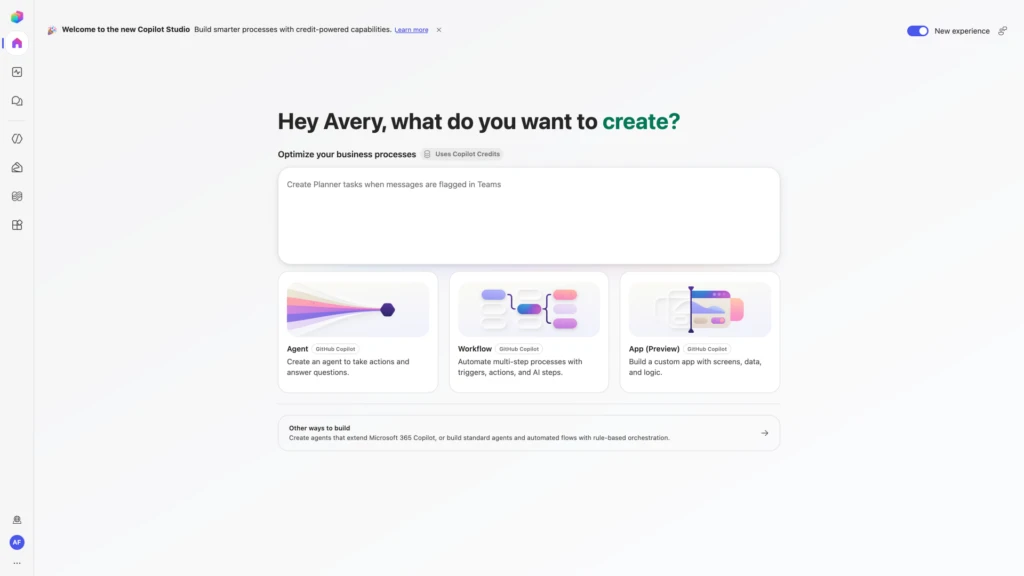
Build an app by describing what you need
App building starts with a conversation. Choose App (Preview) from the Copilot Studio home screen or invoke the /app skill in your Copilot Cowork chat. Then, simply describe the business outcome, users, data, and actions you need. Copilot Studio uses agentic coding to turn your intent into a working app scaffold.
From there, you can continue to iterate in natural language, inspect the app in preview, and review the underlying code. The experience is designed to serve a broad spectrum of builders: information workers can stay focused on the solution, while advanced makers and developers can go deeper into the app’s structure and code when they need more control.
Connect apps to your business data
Apps built with Copilot Cowork and Copilot Studio use connectors to work with your business data, including using Work IQ to access organizational context. This allows makers to turn organizational information into usable, connected experiences—not just surfacing information, but taking action and writing results back to the systems within your Microsoft 365 tenant boundary where work happens.
For example, an onboarding app can use connectors to show progress from a business data source, surface learning resources, and update onboarding records. As another example, a field service app can retrieve product technical context from a third-party system, present guided steps, and write results back to connected systems. The result is a structured app experience that’s grounded in the data and services people use to get work done.

Build enterprise apps with open standards and centralized control
Apps created in Copilot Cowork and Copilot Studio are full-stack apps built using open standards. They can use Git-backed source control, deployment stages, and version isolation so teams can continue improving the next version without disrupting the live experience.
By default, identity with Microsoft Entra, as well as organizational data and connector policies, are respected. IT administrators have centralized visibility in the Microsoft 365 admin center, which shows an inventory of published apps and operational controls to help govern, secure, and manage them throughout their lifecycle. Makers can focus on building and sharing solutions, while IT maintains the oversight needed to run them confidently across the organization.

Start building apps with Copilot Studio
You can start building apps today by joining the Frontier program and using the /app skill in Copilot Cowork. Access to app building natively within Copilot Studio is rolling out in public preview over the next week. When available in your environments, you’ll be able to open Copilot Studio, click the apps tile, and describe what you want to build using natural language. App building and running follows the usage-based billing model.
When published, apps appear in the Microsoft 365 admin center, giving administrators centralized visibility and controls to help govern them from the start. Users will be able to discover and use shared, enterprise-ready applications at managedapps.cloud.microsoft.com.
With apps alongside agents and workflows in Copilot Studio, teams can create complete, interactive business experiences and move from an idea to an enterprise-ready solution. We will continue improving the experience as we learn from customers.
We look forward to seeing what you build.
Dit artikel is afkomstig van Microsoft 365 Blog.
Lees het volledige artikelTags
Gerelateerde artikelen

Introducing the new Copilot with Home, Code and Autopilot
We’re reimagining Microsoft Copilot to enable work as it evolves and to help expand what every individual and every organization can accomplish in the flow of human ambition. Today we’re introducing the new Copilot to connect the tools people rely on with the next generation of capabilities they’ll....

Building the system for AI at work
To our customers, There’s no shortage of sound and fury in AI right now. New models, record benchmarks, louder claims every week. But underneath the noise, something real has happened: AI can now do genuine, economically valuable work. The big question for you today is how to put it to work safely,....

Introducing Microsoft 365 G7: Intelligence + Trust for the mission ahead
The next evolution of Microsoft 365 for government brings productivity, AI, agents, security, identity, compliance, and governance together for organizations operating in Government Community Cloud (GCC) environments. Across government, leaders are being asked to modernize services, address evolving...